# LimeSDR-USB Quick Test(self\_test.ini) faied at Lime Suit GUI in pisdr
**URL:** https://discourse.myriadrf.org/t/limesdr-usb-quick-test-self-test-ini-faied-at-lime-suit-gui-in-pisdr/7080
**Category:** LimeSDR
**Created:** [11 April 2021 12:49 UTC](https://discourse.myriadrf.org/t/limesdr-usb-quick-test-self-test-ini-faied-at-lime-suit-gui-in-pisdr/7080 "2021-04-11T12:49:00Z")
**Posts on this page:** 10
**Page:** 1
### Author:  [@765production](https://discourse.myriadrf.org/u/765production)
#### Post date: [11 April 2021 12:49 UTC](https://discourse.myriadrf.org/t/limesdr-usb-quick-test-self-test-ini-faied-at-lime-suit-gui-in-pisdr/7080/1 "2021-04-11T12:49:00Z")
Hello,
I tried to do self\_test.ini at Lime Suite GUI, as following [LimeSDR-USB Quick Test - Myriad-RF Wiki](https://wiki.myriadrf.org/LimeSDR-USB_Quick_Test)
I could set connectionSettings to limesdr. But I could not open file(self\_test.ini). It shows error message(Failed to load
 file).
My SDR environment
RaspberryPi4 8GB
OS: pisdr-image([GitHub - luigifcruz/pisdr-image: 🥧 A SDR Linux Distro for the Raspberry Pi and other SBC. Compatible out of the box with multiple SDR.](https://github.com/luigifcruz/pisdr-image))
I successed LimeSDR-USB Quick Test(self\_test.ini) in Windows 10.
Thank you
---
### Author:  [@mzs](https://discourse.myriadrf.org/u/mzs)
#### Post date: [11 April 2021 18:14 UTC](https://discourse.myriadrf.org/t/limesdr-usb-quick-test-self-test-ini-faied-at-lime-suit-gui-in-pisdr/7080/2 "2021-04-11T18:14:10Z")
I can see “Low voltage warning Please check your power supply” in the top right hand corner of your screenshot.
I’m going to guess that the RPi4 is going to need about 3 watts if all CPU’s are 100% idle, about 6.5 watts if all CPU’s are 100% active and that the LimeSDR-USB probably needs about 4.5 watts. So my question would be is the power supply that you are using the official Raspberry Pi (15.3W) USB-C power supply ? Because to me it looks like you may have a power problem.
---
### Author:  [@andrewback](https://discourse.myriadrf.org/u/andrewback)
#### Post date: [12 April 2021 07:52 UTC](https://discourse.myriadrf.org/t/limesdr-usb-quick-test-self-test-ini-faied-at-lime-suit-gui-in-pisdr/7080/3 "2021-04-12T07:52:21Z")
Would also suggest running LimeQuickTest to check out the hardware, rather than using the legacy manual test method.
---
### Author:  [@765production](https://discourse.myriadrf.org/u/765production)
#### Post date: [12 April 2021 11:59 UTC](https://discourse.myriadrf.org/t/limesdr-usb-quick-test-self-test-ini-faied-at-lime-suit-gui-in-pisdr/7080/4 "2021-04-12T11:59:05Z")
Dear mzs
Thank you for quick comment
> > all CPU’s are 100% active and that the LimeSDR-USB probably needs about 4.5 watts. So my \>\>question would be is the power supply that you are using the official Raspberry Pi (15.3W) USB-\>\>C power supply ? Because to me it looks like you may have a power problem.
I use max 18W usb-c power adapter(Belkin’s usb-c 68 W GaN ).So,I think it is sufficient power. But, “Low voltage warning Please check your power supply” is displayed in the screen, I will buy Power DC Supply adapter(6-12V) to LimeSDR
---
### Author:  [@765production](https://discourse.myriadrf.org/u/765production)
#### Post date: [12 April 2021 12:17 UTC](https://discourse.myriadrf.org/t/limesdr-usb-quick-test-self-test-ini-faied-at-lime-suit-gui-in-pisdr/7080/5 "2021-04-12T12:17:08Z")
Dear andrewback
Thank for reply soon.
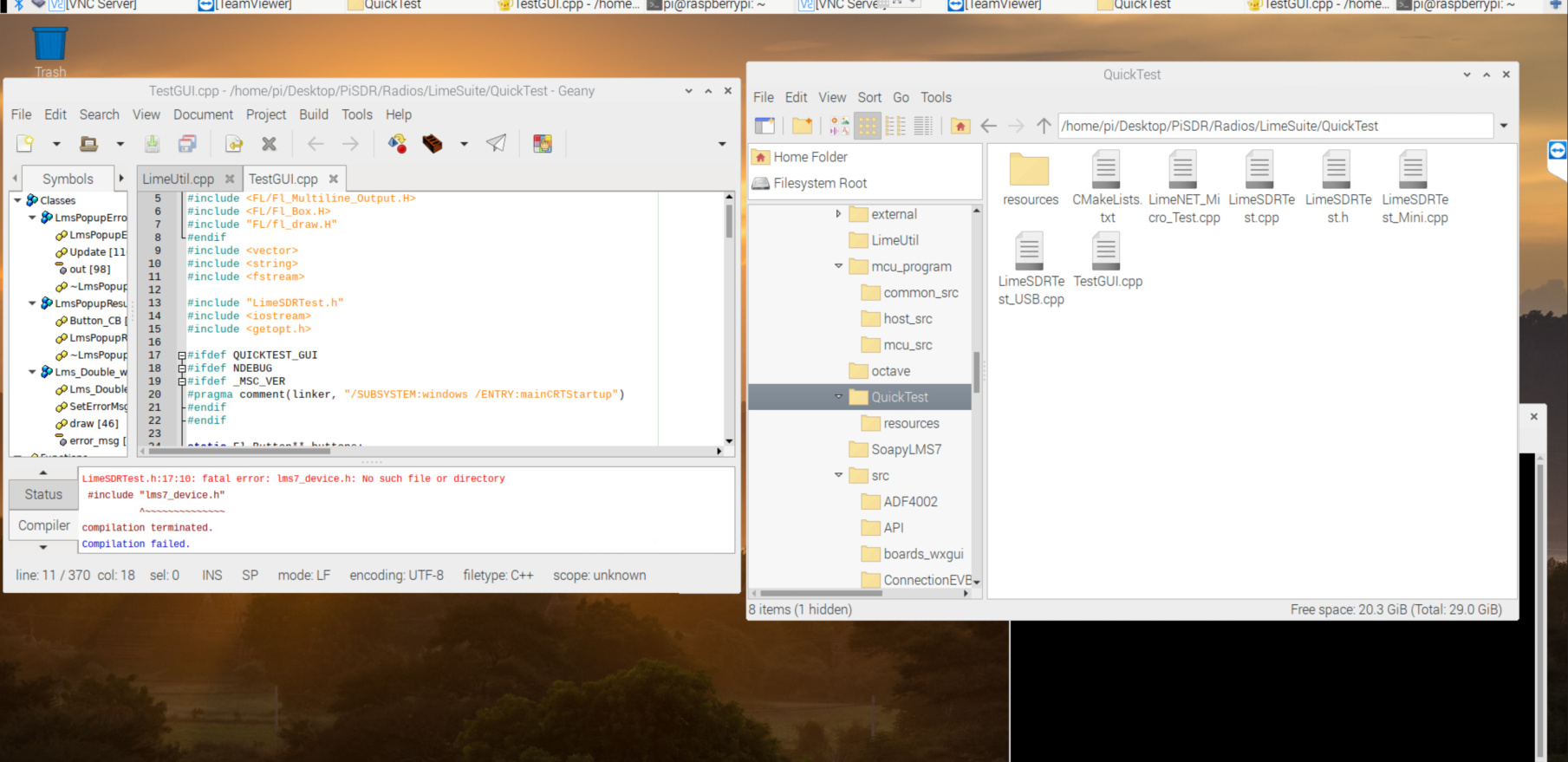
If I run Quick test,what I use file?
I tried to compile TestGUI.cpp,however it failed.
---
### Author:  [@mzs](https://discourse.myriadrf.org/u/mzs)
#### Post date: [12 April 2021 14:37 UTC](https://discourse.myriadrf.org/t/limesdr-usb-quick-test-self-test-ini-faied-at-lime-suit-gui-in-pisdr/7080/6 "2021-04-12T14:37:57Z")
The [README.md](https://github.com/myriadrf/LimeSuite#documentation) in the git repository for LimeSuite points you to instructions on how to either install the binaries (These are for Debian amd64/arm64/armhf based OS’es only) or how to install from [source](https://wiki.myriadrf.org/Lime_Suite#Building_from_source).
Raspbian is based on Debian, so you have two options compile everything from source code the right way (mostly shown in the instructions). Or run the current 32-bit binaries on your 64-bit OS which you needed to run for access to all 8GiB of your RAM.
e.g. (I don’t own a RPi4, so this is me guessing at the commands that you will need to run).
$ sudo dpkg --add-architecture armhf
$ sudo add-apt-repository -y ppa:myriadrf/drivers
$ sudo apt update
$ sudo apt install limesuite:armhf liblimesuite-dev:armhf limesuite-udev:armhf limesuite-images:armhf
$ sudo apt install soapysdr-tools:armhf soapysdr-module-lms7:armhf
And you will probably need to add the [device rule by hand](https://wiki.myriadrf.org/Lime_Suite#Unix_makefiles).
---
### Author:  [@mzs](https://discourse.myriadrf.org/u/mzs)
#### Post date: [12 April 2021 19:44 UTC](https://discourse.myriadrf.org/t/limesdr-usb-quick-test-self-test-ini-faied-at-lime-suit-gui-in-pisdr/7080/7 "2021-04-12T19:44:18Z")
> [@mzs](#):
>
> amd64/arm64/armhf
My bad, I misread that in my head as amd64/x86/armhf, forget what I said, looks like ARM64 is supported, follow the instructions for a binary install and if that fails, then download the Debian [binary files](https://launchpad.net/~myriadrf/+archive/ubuntu/drivers/+packages?field.name_filter=&field.status_filter=published&field.series_filter=focal) and manually install them. The limesuite\_20.10.0.49.1480bfea-myriadrf2\_focal\_arm64.deb will install an ARM64 binary for /usr/bin/LimeQuickTest
---
### Author:  [@765production](https://discourse.myriadrf.org/u/765production)
#### Post date: [13 April 2021 13:25 UTC](https://discourse.myriadrf.org/t/limesdr-usb-quick-test-self-test-ini-faied-at-lime-suit-gui-in-pisdr/7080/8 "2021-04-13T13:25:15Z")
Dear mzs
Thank you for Replay about detail of method about LimeSuit install. I will try it.
But, I have question LimeSuit on PiSDR([https://github.com/luigifcruz/pisdr-image](https://github.com/luigifcruz/pisdr-image)).
PiSDR in github is written that it is installed LimeSuit on PiSDR . Should I install LimeSuit again?
---
### Author:  [@mzs](https://discourse.myriadrf.org/u/mzs)
#### Post date: [13 April 2021 14:29 UTC](https://discourse.myriadrf.org/t/limesdr-usb-quick-test-self-test-ini-faied-at-lime-suit-gui-in-pisdr/7080/9 "2021-04-13T14:29:38Z")
If it is installed then just try running the binary, if it is installed already ?
It should probably be in /usr/bin/LimeQuickTest
But see if the binary is already installed anywhere on the $PATH
`$ which -a LimeQuickTest`
---
### Author:  [@765production](https://discourse.myriadrf.org/u/765production)
#### Post date: [13 April 2021 15:12 UTC](https://discourse.myriadrf.org/t/limesdr-usb-quick-test-self-test-ini-faied-at-lime-suit-gui-in-pisdr/7080/10 "2021-04-13T15:12:13Z")
Dear mzs
Thank you for comment.
I chacked path.
